Want to move your email list from Mailchimp to Mailerlite? If your email list is under 500 subscribers and you want more advanced features, Mailerlite is the perfect solution, offering great features (such as email sequences and RSS emails) in its Free Forever plan.
Yes, I know moving your list sounds like a hassle, but today I’m going to show you how easy it actually is, and it won’t involve any downloading or uploading of spreadsheets or any other files!
Let's Migrate Your Mailchimp Subscriber List to Mailerlite
Log in to Mailerlite
If you haven’t already sign up to Mailerlite.
Navigate to 'Add Subscribers'
Click on the Subscribers tab, then click Add Subscribers, go to the 'Import from Mailchimp' tab and click 'Connect'
Log in to MailChimp
If you are already logged in on the same browser, you will be skipped straight to the next step. If you receive this screen, log in to Mailchimp with your usual details.
Consent to Mailerlite accessing your Mailchimp data
Click Allow.
Choose the lists to import
Check the box(es) of the list(s) you are importing into Mailerlite.
Match the Mailchimp and Mailerlite fields
At this point, you may need to specify which fields to import from Mailerlite. Use the dropdown lists on the right to assign Mailerlite fields to the Mailchimp fields or to tell it to ignore irrelevant fields.
Add to Groups and Trigger Automations
If you're an existing Mailerlite user, when you choose to import your lists to groups with automation linked to them, you will be asked whether Mailerlite should trigger your automation for these subscribers. Check or uncheck as necessary. (If you're new to Mailerlite, you can ignore this)
Finish Importing Subscribers
Click 'Finish Importing Subscribers', and Mailerlite will start the import process. Once it’s done, it will provide a status update, similar to the one in this screenshot, detailing the number of subscribers imported, the number of existing subscribers updated, and the number of new subscribers not added. For updated and failed subscribers, it will add details below the status indicators.
All Done!
That wasn't so bad, was it! No Spreadsheets, no downloads, no uploads. Simple.
Note: If you were using Mailchimp landing pages or forms to gather your subscribers' details, you will want to create Mailerlite versions to replace those so that new subscribers get added to your Mailerlite list rather than your old Mailchimp list.
If you're still undecided on moving to Mailerlite, here are some points for comparison:
Unlike Mailchimp, Mailerlite does not count unsubscribed or duplicated emails against your 1,000 subscriber limit. Mailerlite only counts unique active subscribers, so if you're closing in on the 1,000 subscriber limit, now might be the right time for you to move to Mailerlite.
The MailChimp alternative for people who want a powerful and reliable email marketing tool with all the features you need at no extra cost.
– Mailerlite
Also, Mailerlite's basic paid plan (just $10 a month) is fully featured, whereas with Mailchimp, you would need to pay a higher price to access all the features they offer.
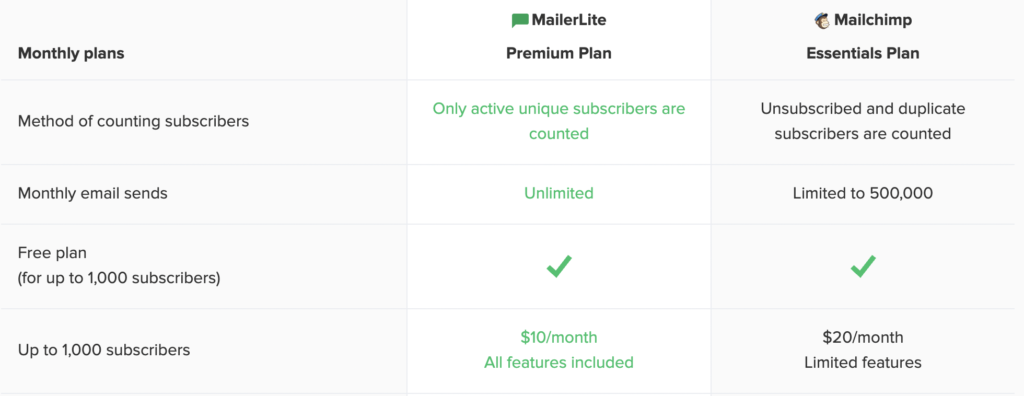
Screenshot of Plan Comparison from Mailerlite.com
New to Email Marketing?
Check out my guide to getting started with email marketing. Already building your list? Are you engaging your subscribers from day one? Subscribe below to get the Ultimate Nurture Sequence Workbook and learn how to write your first automated welcome email sequence.
Yes, that's a Mailerlite form ⬆️, I only recommend tools I use and love!
Found this article helpful? Say Thanks with a Pin 📌