Are you confused about which WordPress to use? WordPress.org or WordPress.com? Is there a difference? What's the difference?
Like siblings, they are very similar in some ways and very different in others, making it hard for those inexperienced to appreciate what is best for their circumstances.
In general, when most people talk about WordPress, they're usually referring to WordPress.org (also known as self-hosted WordPress); this is because, for the majority, this is the best solution. Let's take a more in-depth look at why that is. First, we'll take a look at each of the platforms independently and then compare the two.
What is WordPress.org?
WordPress is open source software you can use to create a website, blog or app. WordPress.org is the home of this software; anyone can download the WordPress software; it's completely free and entirely yours to do with as you please. This means you can modify the software as much as you like to meet your needs.
If you're a beginner, you probably will not worry about modifying the software at this stage. Still, it's important to understand that this can be a significant benefit as your site grows at a later date.
So why is it also referred to as self-hosted? Because you download the software from WordPress.org, you need to install the software on your own web hosting to run it.
As mentioned, you can do whatever you want with your WordPress.org software which means you aren't limited in any way; you have full flexibility. Part of this flexibility includes installing any of the thousands of WordPress themes (free and premium themes) and plugins available in the vast WordPress community.
A WordPress theme is a collection of files, templates, and stylesheets that provide ‘the look’ of your site. WordPress themes have been the de facto way to style WordPress sites for years. There are tens of thousands of them out there, both free themes and premium themes are widely available across the internet.
WordPress plugins add features to your website. For example, if you wanted to add a shop to your WordPress site, you could install the WooCommerce plugin. Or, if you wanted a drag 'n drop page builder for your website, you could install the Elementor plugin.
What is the cost of WordPress.org?
Since your free WordPress software needs to be hosted somewhere, you will need web hosting and a domain.
Typical Cost
Hosting
£4 - £7 / $5 - $10 (per month)
Domain (e.g. sitename.com)
£15 / $10 (per year)
Total £63 - £99 / $70 - $130 per year
*Costs vary dependant on hosting provider/package and domain registrar
What is WordPress.com?
WordPress.com is owned by Automattic, formed by the co-founder of the open-source WordPress.org software. WordPress.com is a simpler way of using WordPress software, providing the hosting, maintenance, security and more all done for you.
With WordPress.com, there is no need to purchase your own hosting and domain; you can get started easily by opening a free account and creating a site free of charge if you're happy to have it on a WordPress.com subdomain (e.g. sitename.wordpress.com).
What is the cost of WordPress.com?
Although WordPress.com uses the same software as WordPress.org, it doesn't have quite the same level of flexibility. If you want to use your own custom domain (e.g. sitename.com), you can do this for $48 per year. WordPress.com will only allow you to select pre-installed plugins and themes; you will not be able to install your own themes and plugins. To do that, you would need to upgrade to the Business Plan at the cost of $240 per year.
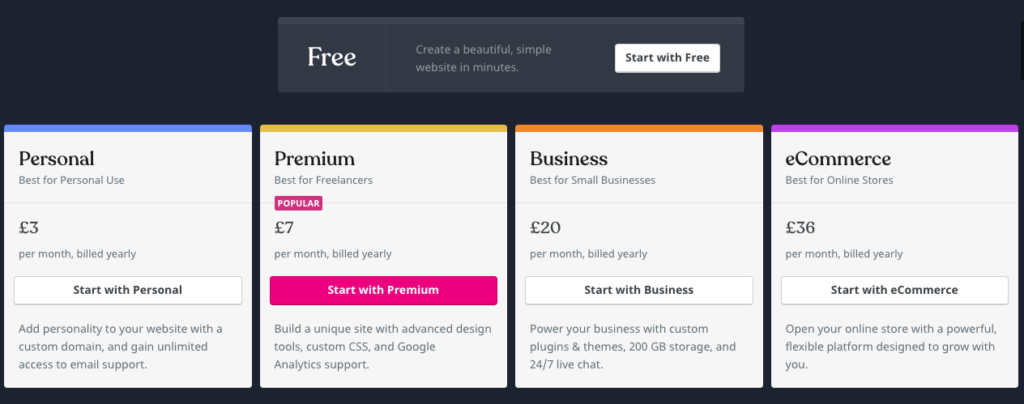
WordPress.com plans (correct at Jan 2, 2021)
It's worth noting that your WordPress.com site will contain advertisements on the free plan, and you would need to upgrade to the Premium plan ($84 per year) to remove these.
It's important to understand that regardless of which WordPress.com plan you go for, you will always be bound by the WordPress.com Terms of Service and must abide by the WordPress.com User Guidelines. Violation of these terms and guidelines can lead to deletion of your account/site!
WordPress.org vs WordPress.com
WordPress.org (Self-hosted)
WordPress.com (Free)
Wordress.com (Business)
Platform Price
FREE
FREE
$240
Hosting
~ $100*
included
included
Own Domain
~$10*
$48
(domain included for first year only)
included
(domain included for first year only)
Install custom themes
✔️
✖️
✔️
Install custom plugins
✔️
✖️
✔️
(some plugins are incompatible)
Flexibility
(Add any code to your site)
✔️
✖️
✖️
*Costs vary dependant on hosting provider/package and domain registrar
Which is right for you?
If cost is the big factor, then WordPress.com certainly seems the most appealing option at first glance. Still, the limitations will become more apparent as you attempt to grow and customize your site; upgrading through the WordPress.com plans will become more expensive than self-hosting whilst retaining many of the limitations, making self-hosting the better, cost-effective long-term plan.
If you plan to monetize your site WordPress.org is the way to go as you will be quite restricted in the ways you can monetize your site whilst using WordPress.com.
If flexibility and features are the big factors, then WordPress.org, the self-hosted version, is definitely the way to go; you will have full control over everything and be entirely responsible for maintaining your WordPress site. The customisation options are endless with self-hosted WordPress.
If you're just starting out and have no experience in maintaining a website or blog, the free WordPress.com plan is a great way to get started, as all the maintenance is done for you.
WordPress.com sites can be migrated to WordPress.org later if necessary, but I recommend going straight for the self-hosted option if it's what you expect to do in the long term.
You can get step-by-step instructions on how to start a self-hosted blog in my guide to starting a blog